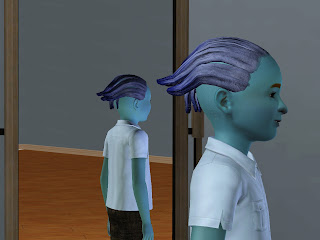
I've been working on a project for Sims 3 to create some Asari from Mass Effect because, well, I thought it would be a nice project that wasn't too ambitious, but would let me explore making hair and skintone. And I want to play with some Asari!
I am really pleased with the way it's turning out so far, and I got to learn all about making bumpmaps which was fun! You can see the face texture is nice and bumpy (ignore the flourescent makeup she's got on):
And even the back texture - for some reason body textures look simply horrid in Sims 3, all blocky and nasty (even the default ones) - I've managed to make it look a bit 3D scaley anyway:
The two other Asari have weird scalp textures because lol, and I mean LOL, I somehow managed to assign naked body textures to their heads. DON'T ASK ME HOW, I'm a dunderhead XD

Well anyway, I've run up against a brick wall now. You see the way the hair piece is working perfectly fine on these girls (except the black lines on the tentacles but I've fixed that now by making a control texture and added a scaley bump map)? Well, I thought it would be a great idea to create versions of it which were available to children, toddlers and *gasp* men (male ASARI? Wtf? I know right, but it's all about freedom of choice my friends). I did everything to protocol: Reshaped the meshes in Milkshape to fit the different ages/genders, aligned normals, assigned bones, added extra data, copied comments, made the LODs, packaged them all together in DABOOBS, used QADPE to get keys from the female hair instead of packaging the same textures again. Essentially, the packages are EXACTLY the same as the female version, but with different shaped meshes.
And then this happened:
WHAT? What is up with that weird arse shadow all over it? To be truthful, I had this same problem with the female version too, but it fixed itself when I repackaged the hairpiece using a default control texture (hence the black lines on the screenshots, but that's fixed now). Here's what I've tried so far to fix it for men and the results (the same problem is on the kids and tots too, but I figured I'd try to fix men first):
- Repackaged using key to default control texture
- NO
- Repackaged using keys to default control and specular textures
- NO
- Repackaged using keys to default control, specular, bumpmap and diffuse textures
- NO
- Repackaged with actual default control, specular, bumpmap and diffuse textures
- NO. *Still* weird looking.
Next I'm going to try creating a package using the meshes from the female version. So essentially, it will be exactly the same as the female version of the hair, with all the same files inside. It will just be assigned for men. Wish me luck. I might jump out the window with frustration at this rate.
***
*VICTORY!*
There must have been something wrong with my meshes. Maybe I shouldn't have aligned the normals of the whole mesh? It looked fine in Milkshape ... I'll resize it and align the normals of each tentacle separately anyway. I would just use the mesh as it is above, but it doesn't fit the head quite right. Woe is me! Nature does not want me to have my male Asari!
I also repackaged the hairpiece with the female meshes, but using the
keys to the female textures instead of packaging the textures themselves. It worked fine. I'll have to muck around with the meshes then. Le sigh. I'm getting there!
***
*Victory is OH so sweet ~ !*
Woohoo! I got my refitted hair to work! Here's what I did differently: Instead of resizing the .ms3d mesh file and aligning normals then adding the extra data and whatnot, I imported the already formatted LOD0 for females and an obj of the face/scalp for men. I refit the hairline and general size of the hair around it, deleted the scalp and face, then exported as LOD0 for males. That's all! I didn't align normals and I don't know what would happen if I did so. I may try it out for the sake of experimentation. Oh, and I kept my LOD1, LOD2 and LOD3 the same as my first attempt at males, because they never had the shading problem.
***
I aligned the normals and it was all fine! I'm so happy! Next, I'll refit the child and toddler meshes. Fingers crossed!
***
Who da farmer? I da farmer! (Sorry inside joke)
YES! Yesyesyesyesyes!! It's working! I can finally move on and finish off everything else on this project :)
The weird white dotty lines on the mesh are because my graphics card is old and decrepit and can't keep up with the graphical demands I make of it these days, not due to anything being wrong with the meshes. In other words, the problem there won't show up for anyone but me.